What We Found
During a recent audit, we triggered a modal dialog on a site, the kind of popup that dims the background and presents new content in the foreground. Visually, it worked exactly as expected. The overlay appeared, the content loaded, everything looked right.
Then we tried navigating with the keyboard.
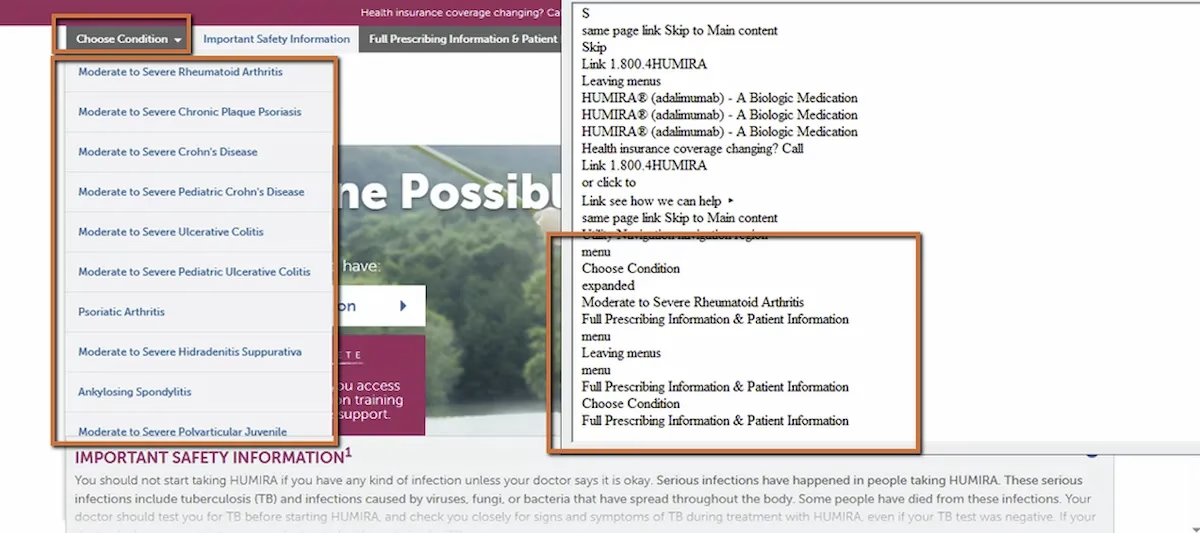
Focus never moved into the modal. Pressing Tab cycled through elements behind the overlay, on the background page the user was supposed to be blocked from interacting with. The screen reader didn’t announce that a dialog had opened. For a keyboard or screen reader user, the modal effectively didn’t exist. The page just kept going as if nothing had happened.
WCAG 2.4.3: Focus Order / WCAG 2.1.1: Keyboard (Severity: High)
Why This Is a Big Deal
Modals are supposed to temporarily take over the page. That’s the whole point. They interrupt the flow, present something important, and require the user to engage before continuing. On sites in healthcare, finance, and government, modals often contain critical content: safety information, legal disclosures, confirmation steps, consent forms.
When focus doesn’t follow the visual shift, a split experience is created. Sighted users see the new content layer. Keyboard and screen reader users are stuck behind it, navigating a page that’s visually dimmed and conceptually inactive, with no indication that something new appeared on top.
Worse, if the modal contains required actions like accepting terms or confirming a selection, keyboard users can’t complete the task at all. They’re blocked.
What Should Happen
A properly implemented modal does three things:
On open, focus moves immediately into the dialog container or its first interactive element. The screen reader announces the dialog context.
While open, focus is trapped inside the modal. Pressing Tab cycles through the modal’s interactive elements only. Background content is unreachable.
On close, focus returns to the element that triggered the modal. The user picks up exactly where they left off.
This is the focus management cycle, and it needs to happen every single time a modal opens. If any step is missing, the experience breaks.
Why This Happens
Almost every time we see this issue, it’s because the modal was built visually but not programmatically. The CSS is there: the overlay, the z-index, the centered container. But the JavaScript that manages focus was either skipped or incomplete.
Common causes include no scripted focus assignment after the modal opens, missing focus trap logic so Tab escapes into the background, no aria-modal=”true” attribute to tell assistive technology the background is inactive, and no logic to return focus to the trigger element on close.
Native HTML doesn’t have a built-in modal element that handles all of this automatically (the dialog element is getting closer, but adoption and implementation vary). So modal accessibility requires intentional development. It doesn’t happen by default.
The Fix
The modal container needs semantic attributes:
<div role="dialog" aria-modal="true" aria-labelledby="modal-title" tabindex="-1" id="brand-modal"> <h2 id="modal-title">Important Safety Information</h2> <!-- modal content here --></div>When the modal opens, move focus into it:
const modal = document.getElementById("brand-modal");modal.focus();Add focus trapping so Tab only cycles through elements inside the modal. And when the modal closes, return focus to the trigger:
triggerElement.focus();The code isn’t complex. But it has to be deliberate.

Learn more about our human-led accessibility solutions that enable access for all
The Bigger Picture
This is a pattern we see constantly: the visual layer of an interface is polished and complete, but the programmatic layer underneath doesn’t match. For modals, that gap is especially disruptive because the entire point of a modal is to redirect the user’s attention. If the redirect only happens visually, you’ve created two completely different experiences on the same page.
Focus management isn’t just about modals either. It applies any time the interface changes dynamically: tabs, accordions, dropdown menus, inline editing, notification banners. Anytime new content appears or the interaction context shifts, focus needs to follow.
Bottom Line
Visual layering doesn’t define accessibility. Programmatic focus does. A modal that opens on screen but doesn’t capture keyboard focus is broken for every user who doesn’t navigate with a mouse. Focus in, trap, focus out. Every time.
Keyboard accessibility ensures that users who don’t use a mouse can interact with modal dialogs, including reading content and completing required actions.
If focus stays on the background page, users may not know the modal opened and cannot interact with its content, making it effectively unusable.
Focus trapping keeps keyboard navigation inside the modal while it’s open, preventing users from tabbing into background content.
Move focus into the modal on open, trap focus within it, use proper ARIA attributes like aria-modal="true", and return focus to the trigger element when the modal closes.