Overview
Pedestrian crossing signals play a critical role in public safety, particularly for blind, low-vision, and mobility-impaired pedestrians who rely on audible cues and predictable timing to cross streets safely. When a crossing signal is not working, reporting it quickly is essential.
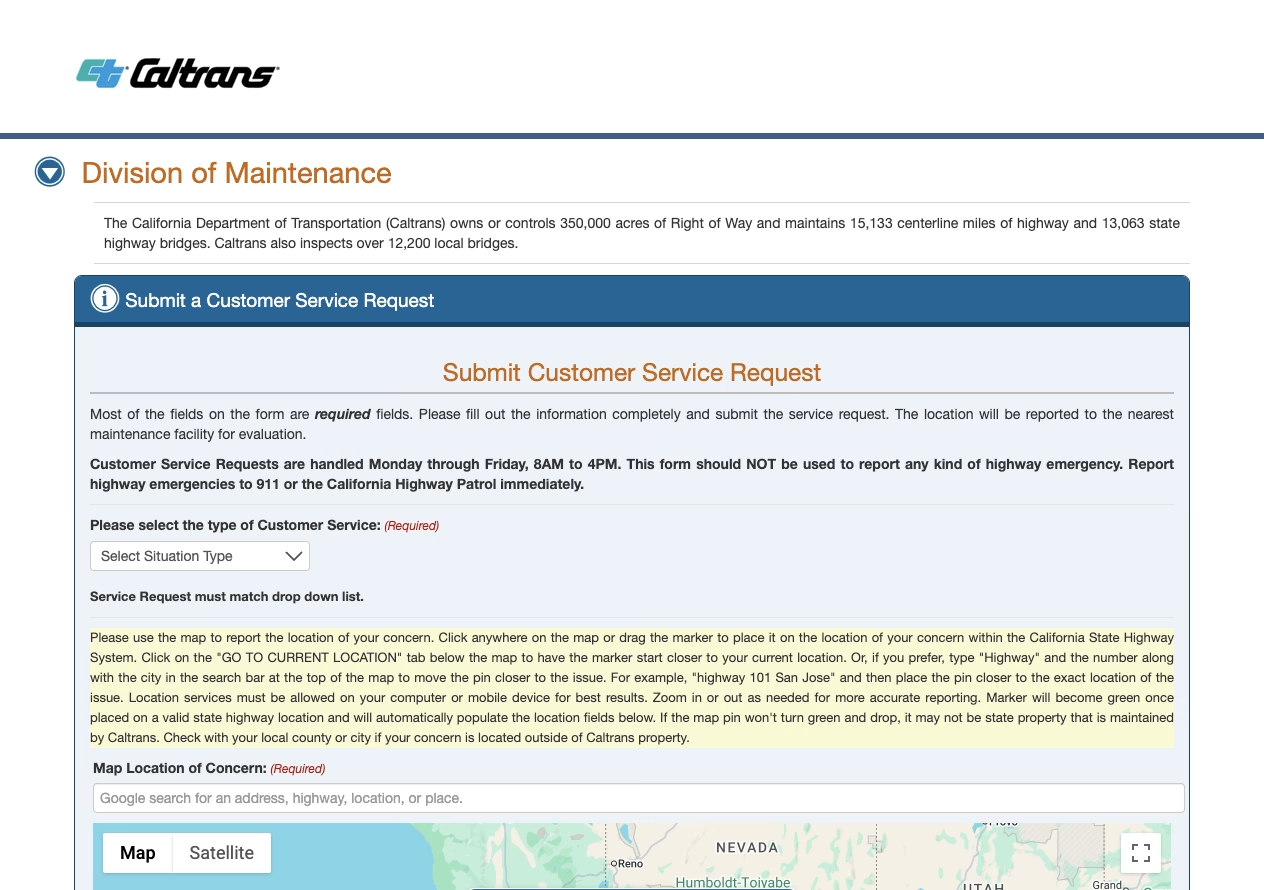
California provides a centralized way for the public to report roadway and traffic control issues through the customer service request system operated by the California Department of Transportation. On paper, this system exists to improve safety and responsiveness.
In practice, however, it reveals a significant accessibility gap.
The Problem
When residents attempt to report a nonworking pedestrian crossing signal, they are directed to an online grievance form. The issue is that the form itself is not fully accessible to people who use assistive technology.
For users who rely on screen readers, keyboard navigation, or other accessibility tools, completing and submitting the form may be difficult or impossible. This creates a paradox: individuals most affected by a broken crossing signal may be unable to report the hazard.
This is not a minor usability flaw. It is a breakdown in the safety reporting process. The system assumes that everyone can access the reporting tool, while excluding some of the very people it is meant to protect.
Below are five WCAG accessibility barriers that are observed on the service request portal, https://csr.dot.ca.gov/, found through manual accessibility review patterns and assistive-technology behavior.
These are framed as specific, testable barrier types rather than speculation, and each maps directly to WCAG 2.1 AA success criteria.

Learn more about our human-led accessibility solutions that enable access for all
1. Form Fields Without Programmatic Labels
WCAG 2.1 – 1.3.1 (Info and Relationships), 4.1.2 (Name, Role, Value)
Several input fields rely on placeholder text or visual proximity rather than on properly associated <label> elements. Screen reader users may hear “edit text” with no context, making it unclear what information is being requested.
Impact:
Blind and low-vision users cannot reliably complete or review the form independently.
2. Required Fields Not Identified to Assistive Technology
WCAG 2.1 – 3.3.2 (Labels or Instructions)
Required fields are often visually indicated (for example, with an asterisk or color), but that requirement is not announced programmatically to screen readers.
Impact:
Users may repeatedly submit incomplete forms without understanding why the submission fails.
3. Error Messages Not Announced or Not Linked to Fields
WCAG 2.1 – 3.3.1 (Error Identification), 4.1.3 (Status Messages)
When form validation errors occur, messages may appear visually on the page but are not automatically announced to screen reader users or programmatically associated with the relevant field.
Impact:
Users may not know an error occurred or where to fix it, effectively blocking form submission.
4. Keyboard Focus Order Is Confusing or Incomplete
WCAG 2.1 – 2.4.3 (Focus Order), 2.1.1 (Keyboard)
Keyboard users may experience focus jumping unpredictably, skipping form sections, or landing on non-interactive elements. In some cases, interactive components are difficult or impossible to reach by keyboard alone.
Impact:
Users who cannot use a mouse may be unable to complete the grievance process.
5. Insufficient Instructions for Complex Inputs
WCAG 2.1 – 3.3.2 (Labels or Instructions)
Fields that require specific formats (location details, descriptions, categories, or attachments) often lack clear, programmatically associated instructions explaining what is expected.
Impact:
Users with cognitive disabilities and screen reader users may struggle to understand how to provide acceptable input.
Why This Matters
The customer service request portal is the mechanism for reporting safety hazards, including non-functioning pedestrian crossing signals. When the reporting tool itself contains WCAG failures, people with disabilities may be prevented from reporting issues that directly affect their safety and independence.This creates an accessibility breakdown before the physical environment is ever reached.
Broken pedestrian signals are time-sensitive safety concerns. When they cannot be reported easily, hazards may persist longer, increasing risk for pedestrians who already face disproportionate danger in traffic environments.
Accessibility is often framed as a physical concern (curb ramps, tactile paving, audible signals). But digital systems are part of the same infrastructure. Reporting tools, forms, and portals are often the first point of contact, and when they are inaccessible, the barrier begins long before someone reaches the intersection.
Public agencies frequently publish accessibility commitments, yet inaccessible reporting systems undermine those commitments in practice.
If the goal is safer streets for everyone, then the tools used to report safety hazards must be accessible to everyone. That means forms that meet accessibility standards are tested with assistive technology, and can be used independently by people with disabilities.
Accessibility does not stop at the crosswalk. It extends to the digital systems that determine whether a safety issue is ever addressed.